


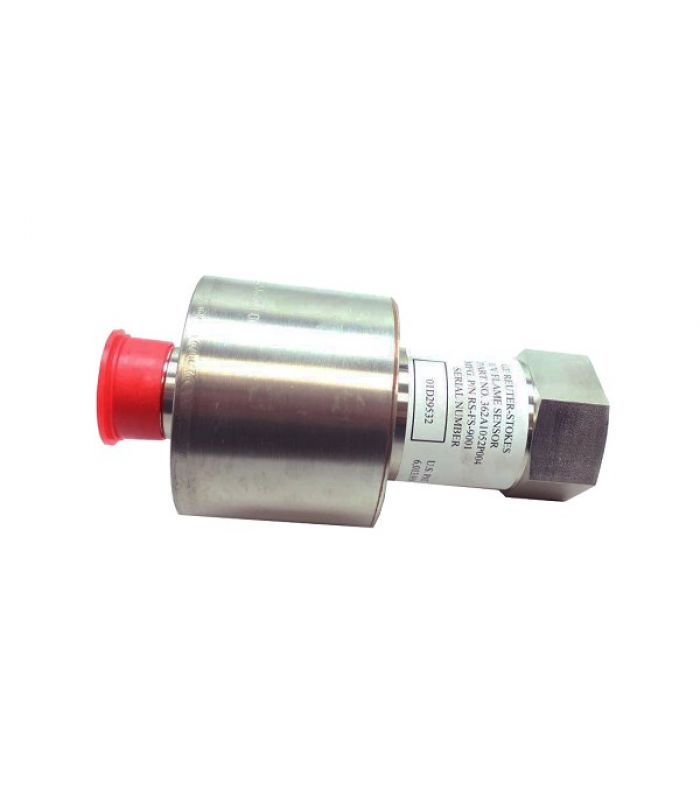
GE RS-FS-9001 Flame Detector
- Product Code: RS-FS-9001
- Availability: In Stock
GE RS-FS-9001 Flame Detector
Technical Documentation for Industrial Safety Monitoring
1. Overview
The GE RS-FS-9001 is an advanced flame detector designed for industrial safety monitoring and control systems. Utilizing state-of-the-art silicon carbide (SiC) ultraviolet (UV) sensing technology, this device provides reliable and accurate flame detection in various industrial environments.
The RS-FS-9001 is engineered to quickly and accurately detect the presence of flames, even in harsh conditions with high temperatures, pressure, and electromagnetic interference. Its robust construction and high sensitivity make it suitable for use in demanding applications such as oil and gas, petrochemical, power generation, and manufacturing facilities.
GE RS-FS-9001 Flame Detector with key components labeled
2. Specifications
General Specifications
- • Model: RS-FS-9001
- • Type: UV Flame Detector
- • Manufacturer: GE Reuter-Stokes
- • Sensing Technology: Silicon Carbide (SiC) Photodiode
- • Output Signal: 4-20 mA analog
- • Response Time: < 1 ms
Environmental Specifications
- • Operating Temperature: -40°C to +150°C (-40°F to +302°F)
- • Storage Temperature: -40°C to +70°C (-40°F to +158°F)
- • Humidity: 5% to 95% RH, non-condensing
- • Protection Rating: IP65
- • Hazardous Area Certifications: Class I Division 2, Zone 2, ATEX, IECEx
Electrical Specifications
Power Requirements
- • Input Voltage: 12-48 VDC
- • Current Consumption: Max 20 mA
- • Output Voltage: 5 VDC (internal)
Performance Characteristics
- • Sensitivity: Adjustable
- • Accuracy: ±0.5% full scale
- • Detection Range: 0-10 meters (depending on flame size)
Physical Dimensions
- • Dimensions: 170mm x 105mm x 32mm
- • Weight: Approximately 120g
- • Material: Aluminum alloy housing
3. Installation Guide
3.1 Pre-Installation Requirements
Safety Precautions
- • Ensure the installation area is non-hazardous before beginning work
- • Do not disconnect the connector while the circuit is energized
- • Allow the sensor to cool to a safe handling temperature before touching
- • Use appropriate personal protective equipment (PPE) during installation
Tools and Materials Required
- • Mounting bracket and hardware (included with detector)
- • Screwdriver set (Phillips and flathead)
- • Wrench set
- • Electrical cable (appropriate for application and environment)
- • Cable glands and conduit (if required)
- • Anti-seize compound (for mounting threads)
- • Isopropyl alcohol or similar residue-free solvent (for lens cleaning)
3.2 Mounting Procedure
-
Step 1: Select Mounting Location
Choose a location that provides a clear line of sight to the area where flame detection is required. Ensure the detector is positioned to avoid false alarms from sources such as sunlight, heating elements, or other non-flame UV sources.
-
Step 2: Prepare Mounting Surface
Ensure the mounting surface is clean, flat, and sturdy enough to support the detector. Mark the positions for the mounting screws based on the mounting bracket dimensions.
-
Step 3: Install Mounting Bracket
Secure the mounting bracket to the mounting surface using the provided hardware. Tighten the screws to the recommended torque specification (2.5 Nm).
-
Step 4: Attach Detector to Bracket
Apply a small amount of anti-seize compound to the mounting threads. Attach the detector to the mounting bracket and tighten securely. Ensure the sensor head is oriented correctly to provide the desired field of view.
-
Step 5: Verify Alignment
Double-check the alignment of the detector to ensure it has a clear view of the monitored area. Adjust if necessary.
3.3 Wiring Instructions
Connector Pinout
| Pin Number | Function | Description |
|---|---|---|
| 1 | +V (Power Input) | 12-48 VDC power supply |
| 2 | -V (Ground) | Power supply ground |
| 3 | Output + | 4-20 mA signal output (positive) |
| 4 | Output - | 4-20 mA signal output (negative) |
| 5 | NC | Not connected |
Wiring Procedure
- Turn off power to the circuit before making any connections
- Route the electrical cable from the control panel to the detector location
- Strip approximately 10mm of insulation from the ends of the cable wires
- Connect the wires to the appropriate terminals according to the pinout diagram
- Ensure all connections are secure and properly insulated
- Install cable glands or conduit to provide strain relief and environmental protection
- Verify all wiring connections before applying power
3.4 System Integration
The GE RS-FS-9001 flame detector is designed to integrate with various industrial safety systems. The following diagram illustrates a typical integration:
Typical System Integration of GE RS-FS-9001 Flame Detector
After completing all physical connections, apply power to the system and verify communication with the control panel. Refer to the control panel documentation for specific configuration requirements.
4. Configuration Instructions
4.1 Initial Setup
-
Step 1: Apply Power
Apply power to the detector and allow it to initialize. The initialization process takes approximately 30 seconds.
-
Step 2: Access Configuration Mode
Using the configuration software or control panel interface, access the detector's configuration mode. Refer to the control panel documentation for specific instructions.
-
Step 3: Set Basic Parameters
Configure the following basic parameters:
- Detection sensitivity
- Response time
- Alarm thresholds
- Output signal scaling
-
Step 4: Save Configuration
Save the configuration settings and exit the configuration mode. The detector will restart with the new settings.
4.2 Sensitivity Adjustment
The sensitivity of the RS-FS-9001 flame detector can be adjusted to optimize performance for specific applications. Follow these steps to adjust the sensitivity:
- Access the detector's configuration menu
- Navigate to the "Sensitivity" settings
- Adjust the sensitivity level using the appropriate control (typically a slider or numeric input)
- Save the new setting
Sensitivity Guidelines
- • High Sensitivity (1-3): For small flames or applications requiring maximum detection distance
- • Medium Sensitivity (4-7): General purpose applications
- • Low Sensitivity (8-10): For large flames or environments with potential false alarm sources
4.3 Alarm Threshold Configuration
The RS-FS-9001 allows configuration of alarm thresholds to suit specific application requirements. The detector provides both primary (high) and secondary (low) alarm thresholds.
Alarm Threshold Parameters
| Parameter | Description | Default Value |
|---|---|---|
| High Alarm Threshold | Triggered when flame intensity exceeds this level | 16 mA (80% of full scale) |
| Low Alarm Threshold | Triggered when flame intensity drops below this level | 8 mA (40% of full scale) |
| Alarm Hysteresis | Prevents chattering between alarm states | 2 mA |
| Alarm Delay | Time delay before alarm is triggered | 0.5 seconds |
To configure alarm thresholds:
- Access the detector's configuration menu
- Navigate to the "Alarm Settings" menu
- Adjust the high and low alarm thresholds as required
- Set the alarm hysteresis and delay parameters
- Save the configuration changes
5. Troubleshooting
5.1 Common Issues and Solutions
| Symptom | Possible Cause | Recommended Action |
|---|---|---|
| No current output | - Reversed polarity - Open wire - Power supply failure |
- Check and correct wiring polarity - Inspect cable for breaks or loose connections - Verify power supply voltage |
| Low sensitivity during operation | - Dirty lens - Misalignment - Grounded cable |
- Clean lens with isopropyl alcohol - Check and adjust detector alignment - Inspect cable for ground faults |
| False alarms | - Sensitivity too high - Exposure to UV sources - Electrical interference |
- Reduce sensitivity - Relocate detector or shield from UV sources - Check for electromagnetic interference sources |
| Intermittent low readings | - Condensation on lens - Vibration - Loose connections |
- Check environmental conditions - Secure mounting and wiring - Tighten all connections |
| Detector overheating | - Ambient temperature too high - Cooling system failure - Blocked ventilation |
- Verify operating environment - Check cooling system (if equipped) - Ensure ventilation is unobstructed |
5.2 Diagnostic Procedures
Sensor Checkout
- Disconnect power from the detector
- Remove the detector from its mounting
- Inspect the lens for dirt, damage, or condensation
- Clean the lens with isopropyl alcohol if necessary
- Check the cable and connections for damage
- Reconnect power and verify output signal
Signal Testing
- Connect a multimeter to the detector's output terminals
- Apply power to the detector
- Verify the baseline current (should be approximately 4 mA with no flame)
- Introduce a test flame in front of the detector
- Verify the current increases to indicate flame detection (typically 16-20 mA)
- Remove the test flame and verify the current returns to baseline
5.3 Maintenance
Warning
Always disconnect power before performing maintenance. Allow the detector to cool to a safe handling temperature before touching.
Daily Maintenance
- • Visual inspection of detector and connections
- • Verify detector is powered and functioning
- • Check for error messages or alarms
Monthly Maintenance
- • Clean the detector lens with isopropyl alcohol
- • Inspect cable and connections for damage
- • Test detector response with test flame
Annual Maintenance
- • Complete functional test of detector
- • Verify calibration and adjust if necessary
- • Inspect mounting hardware and tighten if necessary
Lens Cleaning Procedure
- Disconnect power from the detector
- Remove the detector from its mounting
- Moisten a clean, lint-free cloth with isopropyl alcohol
- Gently wipe the lens in a circular motion
- Allow the lens to dry completely before reinstalling
- Reinstall the detector and restore power
6. Interactive Diagram
The following interactive diagram provides a visual representation of the GE RS-FS-9001 flame detector and its components. Hover over the different parts to view detailed information.
Diagram Controls
Use the following controls to interact with the diagram:
- Hover over components to view detailed information
- Click on components to view additional specifications
- Use the zoom controls to enlarge specific areas
GE RS-FS-9001 Flame Detector - Technical Documentation
Document Revision: 1.0
Last Updated: November 12, 2025